Skip to content
Light & Optics · Physics

Convex Lens Image Distances: Class 10 Virtual Lab

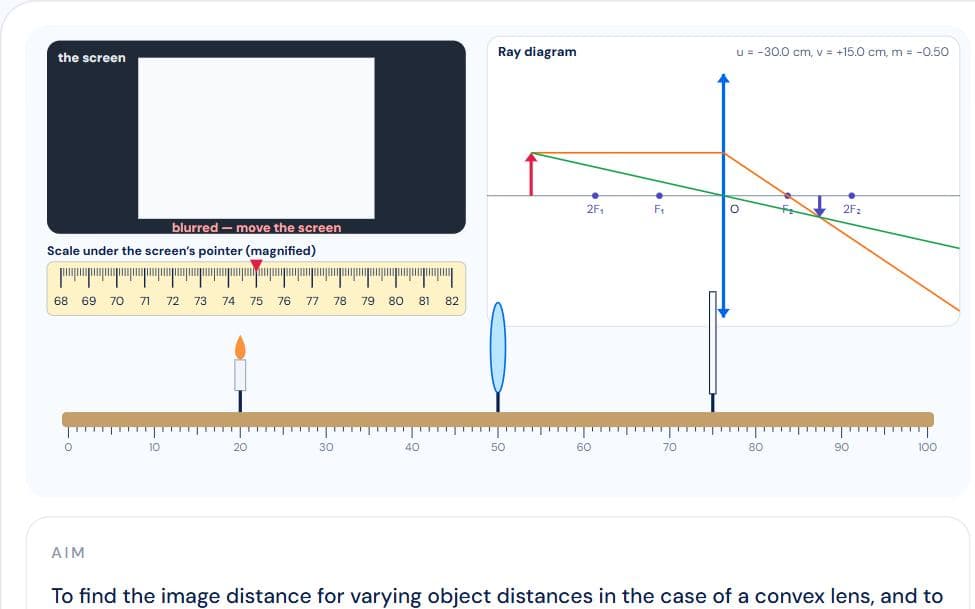
A candle, a convex lens and a screen on a metre bench. Put the candle beyond 2F₁, at 2F₁, between F₁ and 2F₁, at F₁ and inside F₁; for each, slide the screen until the flame is sharp, read both pointers to the 1 mm least count, and see the matching ray diagram. At F there is no sharp image anywhere, and inside F you look through the lens for the virtual image. The observation table, result, precautions and viva follow.

Interactive virtual lab · no download · works on phones and laptops

Chapter
Light: Reflection and Refraction · Class 10 Practical
For
Class 10 · CBSE practical
Time
~25 min

Convex Lens Practical: Image Distance for Different Object Distances is a Pro simulation

Pro opens all 152 virtual labs — 693 simulations with guides and quizzes.

How to use it

  1. 1Step through with Next; at “Five object positions” drag the candle and the screen (or nudge them).
  2. 2When the flame on the screen is sharp, read both pointers on the magnified scale and record.
  3. 3Open “Ray diagrams” to see each case drawn.

What to notice

  • Beyond 2F₁: real, inverted, diminished, between F₂ and 2F₂.
  • At 2F₁: same size at 2F₂; between F₁ and 2F₁: enlarged beyond 2F₂.
  • At F₁ the image is at infinity; inside F₁ it is virtual, erect and enlarged.

For teachers

A ready-made teaching kit comes with this lab

  • Lesson plan

    28 min, 4 steps

  • Ask the class

    4 questions with answers

  • Quick quiz

    6 questions, printable

  • Key formulas

    2 formulas

About the Convex Lens Practical: Image Distance for Different Object Distances simulation

The CBSE Class 10 practical “to find the image distance for varying object distances in the case of a convex lens with ray diagrams”, on an online optical bench simulation: a candle, a convex lens at the 50 cm mark and a white screen.

Put the candle beyond 2F, at 2F, between F and 2F, at F and inside F. For each, slide the screen until the flame is sharp — the picture blurs with the real amount of defocus — and read both pointers to the 1 mm least count. At F no position gives a sharp image, and inside F you look through the lens to see the virtual image. The ray diagram for every case is drawn beside the bench.

Also covers: to find image distance for varying object distances of a convex lens, convex lens ray diagrams, image formation by convex lens, object at 2f, object between f and 2f, object beyond 2f, object at focus, virtual image convex lens, optical bench, candle and screen, class 10 practical, class 10 practicals, class 10 physics practical, class 10 science practical, cbse class 10 practical, physics practical class 10, virtual lab class 10, practical file.

Frequently asked questions

Where should the object be to get a real image of the same size with a convex lens?

At 2F₁ (twice the focal length). The image forms at 2F₂ on the other side, real and inverted.

Why is no image obtained on the screen when the object is at the focus?

Rays from the focus leave the lens parallel and never meet, so the image is at infinity.

What kind of image does a convex lens form when the object is between F and the lens?

Virtual, erect and enlarged, on the same side as the object — the magnifying-glass case. It cannot be caught on a screen.

How do I draw the ray diagram for a convex lens?

Draw a ray from the top of the object parallel to the axis that refracts through F₂, and one through the optical centre that goes straight on. Where they meet is the top of the image; if they diverge, extend them backward.